Session summary: understand agent orchestration by Burke Holland
Session summary: understand agent orchestration
Session Date: 2026-02-14
Summary Date: 2026-02-14
Summarized By: Dario Airoldi
Recording Link: Watch on YouTube
Duration: ~17 minutes
Speakers: Burke Holland (Senior Cloud Advocate, Microsoft)
Executive summary
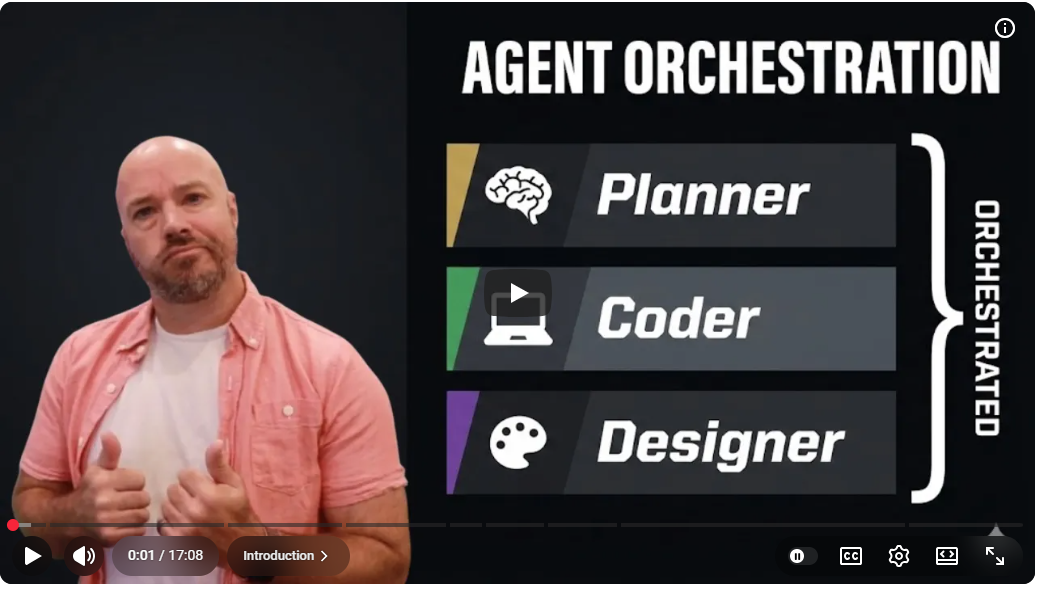
Burke Holland walks through agent orchestration—the practice of having one AI agent coordinate and delegate work to specialized sub-agents. He builds an ultralight orchestration framework in VS Code using four custom agents (orchestrator, planner, coder, designer), each backed by a different model, and demos it live to scaffold a web app from a mobile codebase. The key insight: sub-agents run in isolated context windows, so you can generate thousands of lines of code without exhausting the main conversation’s context.
Table of contents
- 🎯 What agent orchestration is
- 🏗️ The ultralight orchestration framework
- 🧠 Model selection strategy
- 🤖 Orchestrator agent design
- 📋 Planning agent
- 💻 Coder agent
- 🎨 Designer agent
- 🚀 Orchestration in action—live demo
- 🔧 Improving the orchestration
Session content
What agent orchestration is
Timestamps: 0:00–3:37
Key points:
- Today, most developers orchestrate manually—they send separate chat commands to different agents and models, switching between local, background, and cloud agents. They are the orchestrator.
- Agent orchestration flips this: a single agent automatically calls other agents and coordinates their work. This is now possible through recent tooling in both the Copilot CLI and VS Code.
- In the Copilot CLI, you can ask one model to delegate reviews to other models (e.g., GPT-5.2 Codex and Gemini 3 Pro) in a single prompt—no extra configuration needed.
- The delegated models are called sub-agents. They’re available in both the CLI and VS Code, and each sub-agent can use a different model.
“Most people don’t know this is possible, but yes, you can in Copilot have one model call other models. You don’t have to use just one in a chat session. You can use all of them.” — Burke Holland
The ultralight orchestration framework
Timestamps: 3:38–5:37, 10:03–10:09
Key points:
- If one agent can call others, you can essentially build your own dev team: team lead, architects, coders, designers, planners, and PMs.
- Burke’s framework is intentionally minimal—four custom agents defined as
.agent.mdfiles in VS Code:- Orchestrator — coordinates work, never implements anything
- Planner — creates project plans
- Coder — writes all production code
- Designer — handles UI/UX and styling
- The framework is published as a GitHub Gist with one-click install buttons that open VS Code and register each agent.
Resources mentioned:
Model selection strategy
Discussed across: 5:25–5:37, 7:34–7:45, 8:00–8:06, 9:20–9:30, 10:10–10:59
This topic was addressed at several points during the session, reflecting its importance to the overall framework design.
Key points:
- Each agent is assigned the model that best fits its role:
| Agent | Model | Rationale |
|---|---|---|
| Orchestrator | Claude Sonnet 4.5 | Highly “agentic”—eager to take action and delegate |
| Planner | GPT-5.2 | Strong at reasoning and creating structured plans |
| Coder | GPT-5.2 Codex | Purpose-built for code generation |
| Designer | Gemini 3 Pro | Produces the best UI/UX and styling results |
- Burke specifically recommends against using Sonnet 4.5 for code generation—it’s great at coordination but not at writing code.
- Gemini 3 Pro isn’t used for much beyond design, but Burke finds it “unbeatable” for UI work.
“We want the agency of Sonnet and we want the coding chops of Codex.” — Burke Holland
Orchestrator agent design
Timestamps: 5:38–7:22
Key points:
- The orchestrator’s only tools are agent (to call sub-agents) and memory (a new Copilot feature).
- The prompt is simple: “You’re a project orchestrator. You break down complex requests into tasks and delegate them to specialist sub-agents. You coordinate work, but you never implement anything yourself.”
- You must explicitly list which sub-agents are available by name (planner, coder, designer) so VS Code knows what to call.
- The workflow: understand → plan → break into steps → delegate → coordinate → report results.
- Critical rule: The orchestrator must not tell sub-agents how to do their work. Models want to micromanage—you have to explicitly instruct the orchestrator to delegate goals, not solutions.
“These models think they know everything, and so you have to really go out of your way to make sure that they don’t do that.” — Burke Holland
Planning agent
Timestamps: 7:23–7:56
Key points:
- Uses GPT-5.2 as its model.
- Has access to all available tools so it can explore the codebase and gather context.
- Creates plans but doesn’t write code.
- The prompt is deliberately short—“Prompts don’t need to be long and complicated to get the job done. They just need to do the job.”
Coder agent
Timestamps: 7:57–8:57
Key points:
- Uses GPT-5.2 Codex, purpose-built for code generation.
- Has access to many tools plus a Context7 MCP server—a single-tool MCP server that lets the agent look up documentation on demand.
- The prompt includes a block that counters the orchestrator’s tendency to micromanage: “Question everything you’re told. Make your own decisions.”
- Includes optional coding principles like “prefer flat explicit code over abstractions or deep hierarchies.”
Resources mentioned:
Designer agent
Timestamps: 8:58–10:09
Key points:
- Uses Gemini 3 Pro for design work—Burke finds it produces the best UI/UX results.
- The prompt is the simplest of all four agents.
- Key instruction: “Don’t let the orchestrator tell you how to do your job.” The designer needs full creative autonomy.
- Focus areas: usability, accessibility, and aesthetics.
- Minimal guardrails—“We really want to let it do what it does, which is design.”
Orchestration in action—live demo
Timestamps: 10:10–15:08
Key points:
- Burke demos the framework by asking the orchestrator to build a web experience for an existing iOS Gemini chat app that uses Firebase.
- The orchestration flow:
- Orchestrator receives the request and calls the planner
- Planner (GPT-5.2) creates a comprehensive project plan
- Orchestrator reviews the plan and delegates to the designer
- Designer (Gemini 3 Pro) creates a full design system with CSS styles in a markdown document
- Orchestrator passes the plan and design system to the coder
- Coder (GPT-5.2 Codex) uses the Context7 MCP tool to query documentation, then builds the app
Demo summary: The framework generated 2,770 lines of code while using only 10.8K of the context window. This efficiency comes from sub-agents having isolated context windows—each sub-agent’s context is discarded when it finishes, and only the result is returned to the main conversation. The resulting web app was functional (Google sign-in worked) but had some errors that would require further iteration.
“That’s the magic of sub-agents. They have an isolated context window. They only use what’s theirs, and then once the sub-agent is done, that’s gone. It doesn’t pollute the main context window.” — Burke Holland
Improving the orchestration
Timestamps: 15:09–17:05
Key points:
- Plan persistence: The planner should save plans as documents and pass the full plan (not just a high-level overview) to the coder.
- Parallel execution: Instead of one coder agent doing all the work, slice work into discrete chunks and delegate to multiple coder agents running simultaneously—sub-agents support parallel execution.
- Other orchestration frameworks exist for more complex use cases: Gas Town, GSD, and others.
- Burke emphasizes starting simple: “If you could get one agent to delegate work out to a bunch of sub-agents who are very good at different things, that’s a great start.”
Main takeaways
- Agent orchestration is one agent coordinating others
- It’s not a complex framework—it’s a pattern where a coordinator delegates to specialists.
- You can start with the Copilot CLI today without any configuration.
- Match models to roles, not one model for everything
- Different models excel at different tasks. Sonnet 4.5 orchestrates, GPT-5.2 plans, Codex codes, Gemini 3 Pro designs.
- Using the right model per role produces significantly better results.
- Sub-agents preserve context window
- Isolated context windows are the key architectural advantage. Thousands of lines of generated code don’t consume the parent conversation’s context.
- Keep agents autonomous—don’t micromanage
- The biggest prompting challenge is preventing the orchestrator from telling sub-agents exactly what to do. Each agent should make its own decisions within its domain.
- Start simple and iterate
- Burke’s ultralight framework is four short agent files. You don’t need a hundred agents—start with a few and refine.
Questions raised
- Q: Which model is truly best for design—Gemini 3 Pro or alternatives?
- A: Burke favors Gemini 3 Pro for design despite others (like Theo) disagreeing. Personal testing recommended.
- Status: Open — subjective, depends on use case
- Q: How should plans be passed between planner and coder?
- A: Burke identified that saving plans as documents (rather than inline summaries) would improve results.
- Status: Improvement identified, not yet implemented in the demo
- Q: Can sub-agents run in parallel for complex tasks?
- A: Yes—sub-agents support parallel execution, and slicing work into discrete chunks for multiple coders would be an improvement.
- Status: Answered — supported but requires orchestrator prompt refinement
Action items
Decisions made
- Claude Sonnet 4.5 for orchestration, not coding
- Rationale: Sonnet 4.5 is the most “agentic” model—eager to take action—but produces lower quality code than Codex.
- Impact: Framework design separates coordination from implementation.
- Sub-agents get full autonomy in their domain
- Rationale: Models that receive specific instructions from the orchestrator tend to follow them blindly instead of making optimal decisions.
- Impact: Each agent prompt includes explicit instructions to question and override orchestrator directives.
📚 Resources and references
Official documentation
GitHub Copilot Documentation [📘 Official]
Official GitHub Copilot docs covering features, configuration, and the Copilot CLI. Relevant for understanding the sub-agent and multi-model capabilities Burke demonstrates.
VS Code Custom Agents (Chat Participants) [📘 Official]
Documentation on building custom agents in VS Code using .agent.md files. This is the mechanism Burke uses to define the orchestrator, planner, coder, and designer agents.
Copilot CLI Documentation [📘 Official]
Guide to using GitHub Copilot in the command line, including multi-model agent delegation shown in the opening demo.
Session materials
Understand Agent Orchestration — Burke Holland (YouTube) [📗 Verified Community]
Full recording of this session including all demos, agent prompt walkthroughs, and the live orchestration run. Essential viewing for anyone wanting to see the framework in action.
Ultralight Orchestration Framework (GitHub Gist) [📗 Verified Community]
Burke’s complete orchestration framework with one-click VS Code install buttons for all four agents. Start here to try agent orchestration today.
Community resources
Context7 MCP Server [📗 Verified Community]
A single-tool MCP server that provides on-demand documentation lookup. Used by the coder agent in Burke’s framework to query relevant docs during code generation.
Firebase Documentation [📘 Official]
Official Firebase docs. The demo project uses Firebase for authentication and backend services, with the orchestration framework leveraging the Firebase CLI for resource provisioning.
Follow-up topics
Topics identified for deeper exploration:
- Parallel sub-agent execution patterns — Burke mentions this would improve results but doesn’t demo it. Worth investigating orchestrator prompt patterns that reliably produce parallel delegation.
- Plan persistence and handoff — Exploring how to reliably pass full planning documents between agents rather than abbreviated summaries.
- Model comparison for design tasks — Burke and Theo disagree on which model is best for design. A structured comparison test would be valuable.
- Context window efficiency metrics — Measuring exactly how much context is saved via sub-agent isolation across different project sizes.
Next steps
- Install the ultralight orchestration framework and test it on a personal project
- Explore other orchestration frameworks (Gas Town, GSD) for comparison
- Experiment with adding more specialized sub-agents (e.g., testing agent, reviewer agent)
Transcript segments
Expand for key transcript excerpts
Sub-agents and context windows
Timestamp: 14:00
Do you see the context window indicator down here? Look at this. Do you see how
much context window we have not used? It created 2,770 lines of code and we've
only used 10.8K of the context window. How is that possible? That's the magic of
sub agents. They have an isolated context window. They only use what's theirs and
then once the sub agent is done because it has its own context window, that's gone.
It doesn't pollute the main context window.
Preventing orchestrator micromanagement
Timestamp: 6:55
Don't tell sub agents how to do work because these agents really, really, really
want to do the work. And so, what I noticed is that the main orchestrator agent
really wants to tell the sub agents exactly what to do. Wants to give them the line
to change exactly what to change. These models think they know everything and so
you have to really go out of your way to make sure that they don't do that.
Model selection rationale
Timestamp: 10:22
I use Claude Sonnet 45. And the reason that I do this is that Claude Sonnet 45 is
very agentic, right? It's almost like a Labrador, right? It's just super eager,
always trying to do things. And so we want to harness that. We want that energy.
We want the agency that Sonnet 45 has, but we don't want it writing any code. It's
not good at writing code. GPT52 Codeex is just way better at that.
Recording Type: Presentation
Tags: agent-orchestration, sub-agents, copilot, vscode, custom-agents, multi-model, ultralight-framework
Status: Final